
YouTube is the biggest podcast platform you never planned for.
Not an audio app. A video-and-search giant where millions of people already go to look things up — and increasingly, to listen. Your show can live there. The only real question is how, and the wrong answer quietly buries good shows.
Start with the trap, because it’s the thing nobody tells you.
The static-image trap
You can get audio onto YouTube in minutes by handing it your RSS feed — and YouTube will wrap each episode in your cover art as a still-frame “video.” Easy. Free. And brutal on retention.
People click play on YouTube expecting something to watch. They get a motionless logo and a voice, and they’re gone before the intro ends. The platform reads that fast exit as “nobody likes this,” and stops showing it around. A still image isn’t neutral on YouTube. It actively works against you.
So the format question isn’t cosmetic. It decides whether YouTube becomes a growth channel or a graveyard.
Two paths onto YouTube
There are exactly two, and they’re built for different stages.
The RSS path. Paste your feed into YouTube Studio and it auto-creates an episode for every upload — the same one-and-done flow as getting on YouTube Music. Fine for coverage and audio-only listeners. Weak for discovery, because of the trap above.
The video path. You upload real video episodes into a playlist and mark that playlist as a podcast in YouTube Studio. More work — and far more upside: custom thumbnails, chapters, end screens, and the algorithmic push that audio-only never gets.
The honest framing: RSS is how you show up. Video is how you grow.
How the video path actually works
Here’s the part that confuses people: on YouTube, a “podcast” is really a flagged playlist. The episodes are ordinary videos inside it. Flip that one switch and YouTube treats them as a show.
Marking the playlist as a podcast unlocks the Podcasts tab, episode badges, and audio-only play in YouTube Music.
That flag is what gives you the Podcasts tab on your channel, the podcast badge on the watch page, and audio-only listening for people who’d rather just hear it. One setting, a lot of payoff.
You need less gear than you think
The word “video” scares people into not starting. It shouldn’t.
You don’t need a studio, three cameras, or a producer. One decent camera — a recent phone counts — a soft light in front of you instead of a window behind you, and a real microphone. That’s a watchable video podcast. The thing audiences forgive least isn’t a plain set; it’s bad audio. Spend your attention there first.
The case for video — and against it
Video isn’t free. It’s worth being clear-eyed about the trade.
For: video gets more engagement, more algorithmic reach, better retention, and it unlocks thumbnails and faces — the two things that earn clicks on YouTube. It also doubles as raw material for short clips, which are the real discovery engine.
Against: it’s more setup, more editing, and more self-consciousness, especially early. If video is the thing standing between you and publishing at all, then audio-first is the right call — a show that exists beats a video show that never launches.
Most people overestimate how good the video needs to be and underestimate how much consistency matters.
The move most growing shows make: record video, distribute audio
You don’t have to choose one platform. The smart setup feeds them all from a single recording.
Record in video. Publish the video to YouTube, where video wins. Then let the audio from that same session flow out to Spotify, Apple, Amazon Music, and the rest through your RSS feed. One recording, every surface, each in the format that surface rewards.
Two things decide whether anyone watches
On YouTube, before a single second of your episode plays, two things have already done most of the work.
The thumbnail and the title. They’re the entire pitch. A great episode with a lazy thumbnail loses to a mediocre one with a great thumbnail — not because the content is worse, but because nobody got far enough to find out. Treat the thumbnail as its own craft: one clear face or idea, a few big words, readable at the size of a postage stamp. Treat the title as a promise a human would actually click — the question they’re asking, the name they recognize, the outcome they want.
This is the part audio creators most often skip, because audio apps never asked it of them. On YouTube it’s not optional. The thumbnail is the channel.
Clips are the real discovery engine
Here’s the move that quietly grows YouTube channels: the long episode isn’t what finds new people. The clips are.
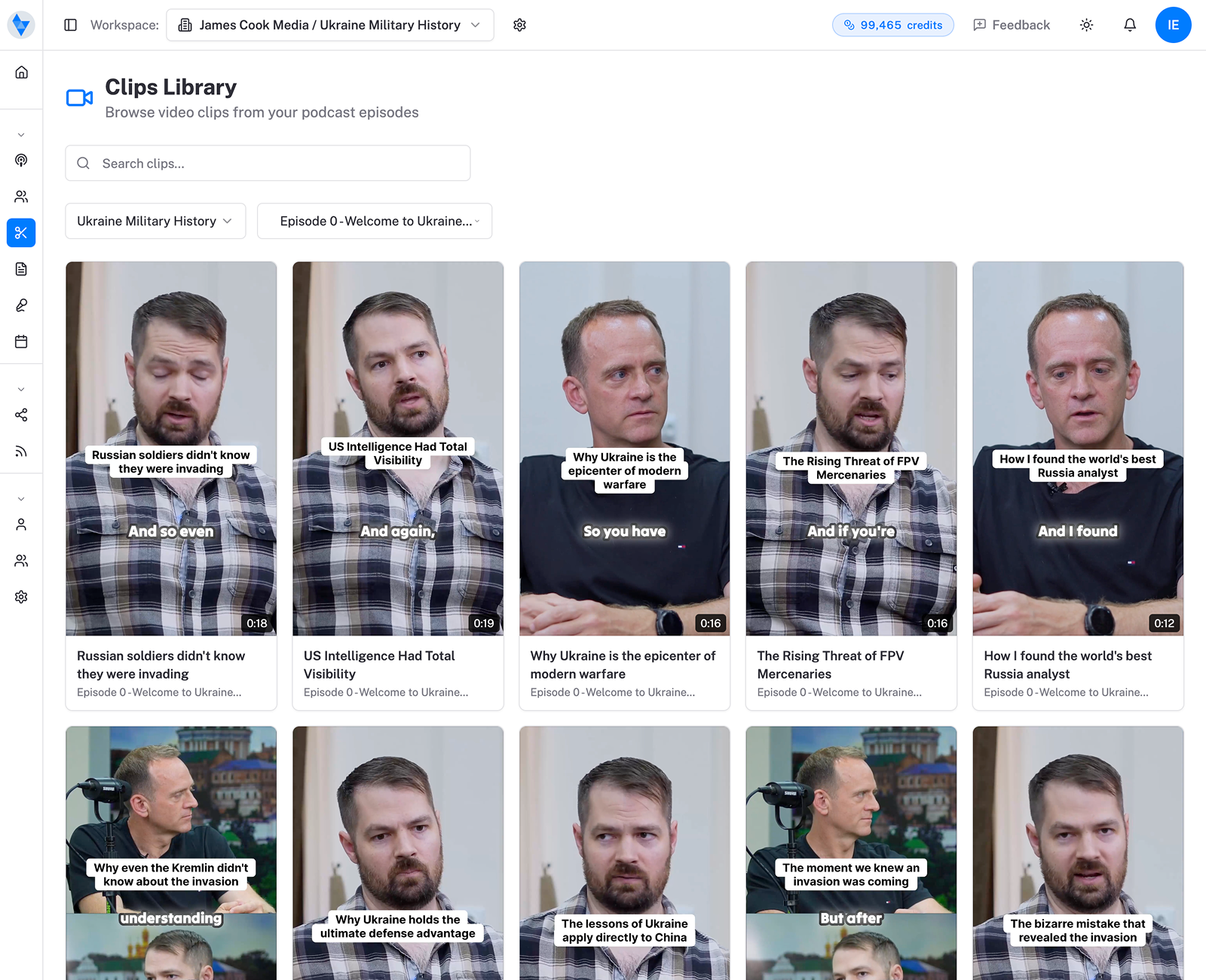
A full episode is for the people who already chose you. Short, vertical clips — the same ones you’d post to Instagram and Facebook — are what the recommendation engine pushes to strangers through Shorts. They’re the trailer that sells the feature. Cut several from every episode, and you give YouTube many small chances to introduce you, each pointing back to the full thing.
Which means the video path and the repurposing habit are the same habit. Shoot the episode once, and it becomes the long upload, the Shorts, the audio everywhere else — a month of content from one sitting.
And once people are watching, keep them watching. End screens that point to your next episode, a playlist that autoplays the series, a pinned comment with the key links — these are the small mechanics that turn a single view into a session, and a session into a subscriber. YouTube rewards shows that keep people on YouTube. Give it somewhere obvious to send them next, every single time.
So — do you actually need video?
If you’re just starting, no. Don’t let a camera stop you from publishing.
Ship audio, get a few episodes under your belt, and use the RSS path to claim your YouTube real estate. But the moment growth is the goal, video stops being optional — it’s where the discovery, the retention, and the reach actually live. The honest answer for most shows that want to grow: get on with audio now, move to video when you’re serious.
Uploaded isn’t the same as watched
Getting onto YouTube is the easy 10%. Earning the click is the other 90%.
A real title, a thumbnail that stops the scroll, short clips that pull people toward the full episode, a description that answers what they searched — that’s the work that turns a presence into an audience. Same principle everywhere: being available is not being found.
Sources: YouTube Help — Create a podcast in YouTube Studio and YouTube — Two paths to a YouTube podcast.